
Missed Calls & Texts
Customers move on when they do not get a quick response.
Managed texting service for small business workflows
SMS Relay gives your business one managed portal for customer texts, AI-assisted replies, appointment requests, after-hours triage, staff escalation, and monthly usage tracking.
The real problem
Small businesses often receive messages through phone calls, texts, website forms, Facebook, email, and staff cell phones. SMS Relay helps bring the important customer conversations into one managed workflow so your team can respond faster and track what happened.
Customers move on when they do not get a quick response.
Urgent messages need a different workflow than routine questions.
Without a central log, it is hard to know who replied and what was promised.
Staff waste time answering the same routine questions over and over.
Workflow first
A customer texts your business number or submits a website request.
The message appears in your portal with customer history and message status.
The system checks business hours, keywords, workflow type, and escalation rules.
AI can draft or send approved routine replies. Anything unclear, risky, or urgent escalates to staff.
Staff can receive app push or SMS alerts when a message, lead, or escalation needs attention.
Messages, segments, status, escalations, and usage are logged for reporting and billing.
Portal preview
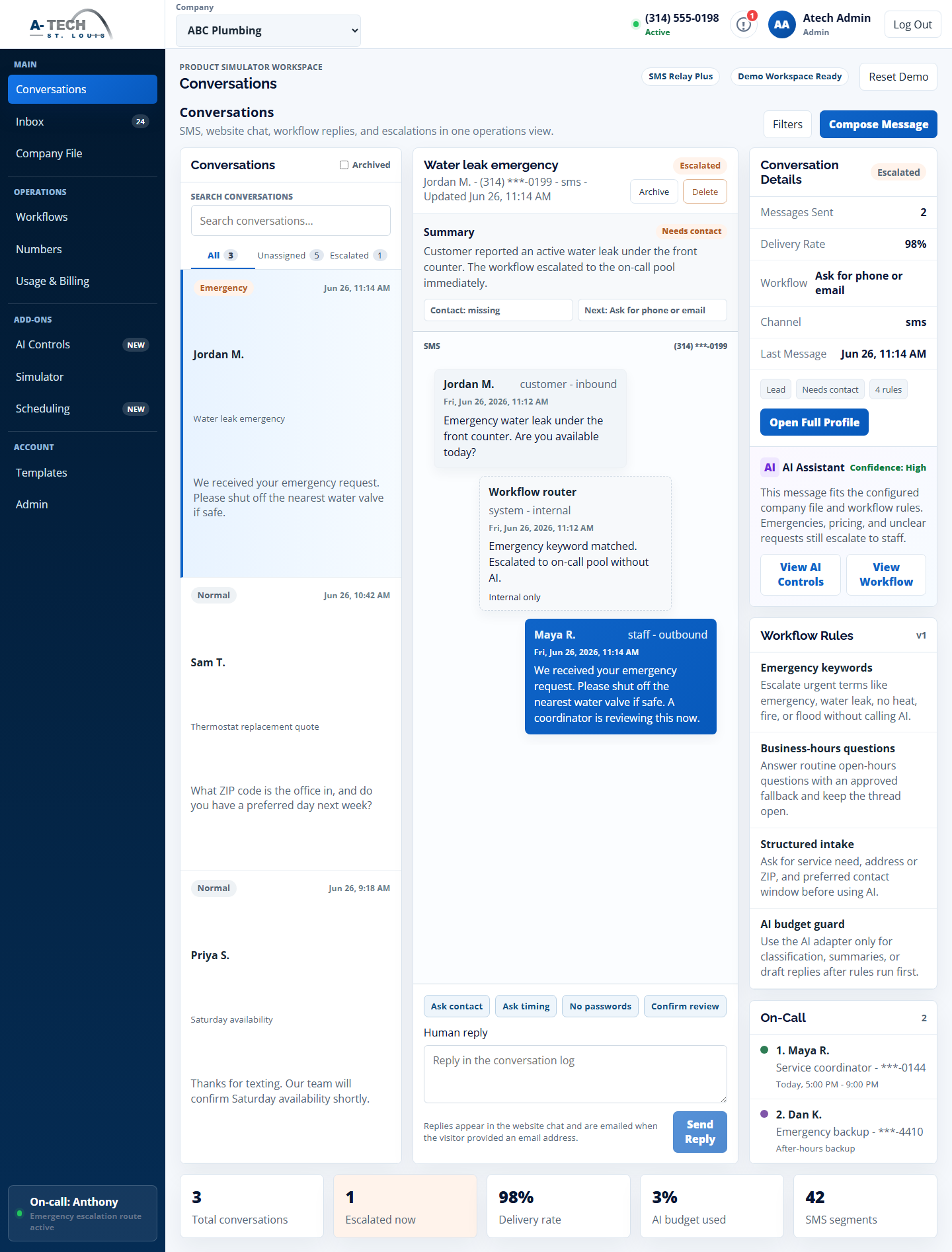
See conversations, workflow status, AI-suggested replies, staff handoffs, escalation rules, and usage from one clean dashboard.
Staff notification layer
Give your team a lightweight phone app for new messages, website leads, after-hours requests, and urgent escalations.
SMS Relay can be installed as a lightweight app so staff can receive push alerts, open the right conversation, acknowledge urgent requests, and escalate to backup when needed. The backend portal remains the source of truth, while the app acts as the fast alert layer for your team.
Installing SMS Relay Alerts on Your PhoneReceive alerts for new messages, website leads, assigned conversations, and urgent events.
Optional text alerts can notify staff for important events, after-hours requests, or escalations.
Staff can acknowledge an alert, open the conversation, or escalate to backup if needed.
Choose app alerts, SMS alerts, or emergency escalation depending on the client's plan.
Recent improvements
SMS Relay now includes more of the everyday workflow pieces small teams need: quick staff alerts, secure reply links, follow-up reminders, delivery visibility, and weekly activity summaries.
Staff can open the right conversation from an alert and reply from the portal, keeping the full history in one place.
Conversations can be marked for follow-up so customer requests are less likely to get lost after the first response.
Outbound message status can be tracked so staff have better visibility when a text is sent or needs attention.
Teams can review message volume, staff reply activity, open conversations, reminders, and failed-send alerts.
STOP requests are respected so staff do not accidentally continue texting someone who has opted out.
Replies, internal notes, reminders, assignments, and status changes stay connected to the customer thread.
Local service workflows
When a call is missed, SMS Relay can help start a text conversation and capture the customer's request.
Collect preferred days, times, service needs, and contact details before staff follows up.
Send an approved after-hours reply, collect details, and separate urgent messages from routine ones.
Urgent messages can notify on-call staff and escalate to backups if nobody acknowledges.
Capture service type, location, photos or details, and customer contact info.
Route WordPress contact forms, quote requests, and appointment requests into SMS Relay so website leads do not disappear in an inbox.
Why it is different
Basic texting apps show messages. SMS Relay helps manage the workflow around those messages.
| Basic Texting App | SMS Relay |
|---|---|
| Shows messages | Routes messages through approved workflows |
| Staff manually replies to everything | AI can draft or handle approved routine replies |
| Limited escalation options | Urgent messages can route to on-call staff |
| Little billing visibility | Message segments and usage can be tracked |
| Generic setup | Business-specific company file, rules, and templates |
| DIY support | Managed setup and support from A-Tech |
Plans
Start with the portal and approved workflows, then add AI, scheduling, after-hours coverage, or emergency escalation as your business grows.
$49/month
+ $299 Workflow Setup
$99/month
+ $299 Workflow Setup
$199/month
+ $299 Workflow Setup
Included setup work
Demo account
Tell us a little about your business and the customer-message workflow you want to test. A-Tech can review the fit, confirm the right demo path, and follow up with next steps.
Add-ons
AI can classify messages, draft replies, summarize conversations, and handle approved routine workflows.
Collect appointment requests, offer approved time windows, send confirmations, and support reminders.
Send approved after-hours replies, collect details, and decide what waits until business hours.
Primary and backup alert chain, ACK tracking, escalation log, and urgent after-hours routing.
Get message volume, response activity, escalation counts, and usage summaries.
Connect WordPress contact forms, quote requests, appointment requests, and website lead forms into SMS Relay so customer messages are tracked, routed, and followed up from one portal.
Keep RCS separate from base SMS Relay plans because carrier approval and setup may require separate costs and review.
Compliance-aware rollout
Business texting requires the right setup, approved use cases, opt-in language, opt-out handling, and carrier/campaign review. A-Tech helps configure SMS Relay carefully so your business has a cleaner launch path.
AI is limited to approved workflows. Unclear, sensitive, risky, or urgent messages should escalate to staff instead of being handled automatically.
Questions
In many cases, yes. Some numbers can support texting directly, while others may require forwarding, hosted messaging, or a new approved texting number. A-Tech can review the best option during setup.
No. SMS Relay is a managed message workflow portal. AI can assist with approved routine replies, but staff escalation and business-specific rules are core parts of the service.
Only inside approved workflows. For unclear, sensitive, urgent, or out-of-scope messages, the system should escalate to staff.
You can choose how after-hours messages are handled: auto-reply, collect details, hold until business hours, or escalate urgent messages to on-call staff.
SMS messages are billed in segments. Longer messages may count as more than one segment depending on length and characters used.
Yes, emergency escalation can be configured as an add-on with on-call contacts, backup contacts, keywords, and escalation logging.
SMS Relay is designed to support WordPress contact forms, quote request forms, appointment requests, and future website chat workflows. Availability depends on the client's website setup and workflow needs.
SMS Relay can be installed as a lightweight Progressive Web App so staff can receive alerts and open conversations from their phone.
Yes. Supported Android browsers can receive web push notifications after the user enables alerts.
Yes, on supported iOS versions, but the user must add the web app to their Home Screen before enabling notifications.
Yes. Notification channels can be configured by package, event type, staff role, and escalation rules.
By default, alerts should stay privacy-safe and only show a short notice. Full message details should be reviewed inside the secure SMS Relay portal.
RCS should be handled separately because setup, approval, and ongoing maintenance can have different provider and carrier requirements.
Business texting often requires provider and carrier registration or campaign approval. A-Tech can assist with setup and review, but approval is subject to provider and carrier requirements.
It covers the initial company profile, approved workflows, templates, routing rules, escalation settings, compliance review assistance, and launch testing.
Start with a workflow review and see how SMS Relay can help your business respond faster, track conversations, and route urgent messages to the right people.